 FLYMORE
One shared flight log
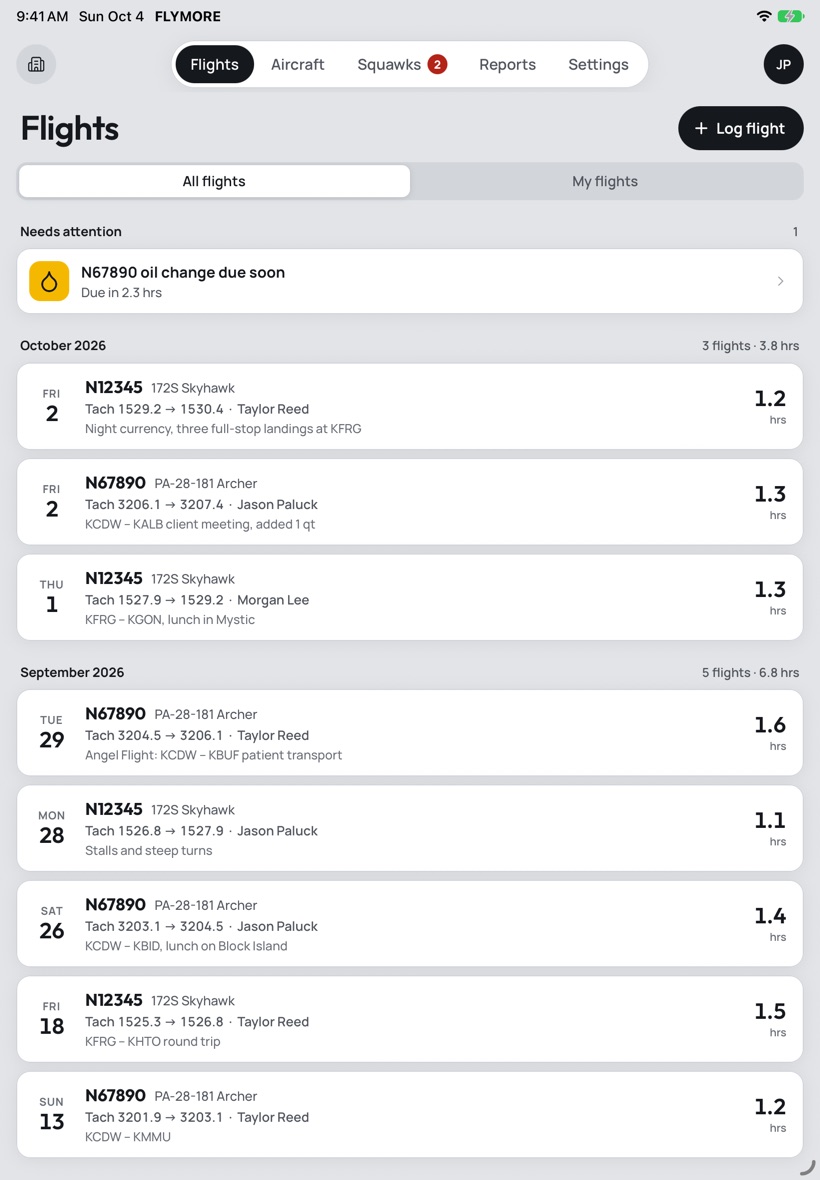
Every partner logs to the same aircraft. Record end tach or Hobbs, flight type, fuel remaining and notes. The starting time fills itself in from the last flight.
For aircraft owners, partnerships and flying clubs
FLYMORE is the logbook for your aircraft, not the pilot. Log every flight, bill hours by pilot, track squawks and stay ahead of oil changes, in one place your whole group shares.
iPhone and iPad. First month free.
What it does
Pilot logbooks track your hours. FLYMORE tracks the airplane: who flew it, what they owe, what's broken and when it's due.
Every partner logs to the same aircraft. Record end tach or Hobbs, flight type, fuel remaining and notes. The starting time fills itself in from the last flight.
See hours by pilot for any month or date range, then email the report as an Excel spreadsheet. Bill on tach or Hobbs, whichever your group uses.
Report problems as minor, major or do-not-fly, with photos. Partners get notified, discuss it in comments and see the moment it's resolved.
A countdown to the next oil change, and a report of hours per quart over time, so you notice when the engine starts using more.
Tag flights as pleasure, business, proficiency, maintenance or charity, so the Angel Flight and Pilots N Paws hours are easy to find at tax time.
Send your organization's invite code and partners join in a minute. Every plan includes unlimited pilots, so nobody is left off the log.
iPhone and iPad
Log a flight from your iPhone on the ramp, then sit down with the full picture on iPad. Same account, same data, built for the bigger screen.
Who it's for
Two to a dozen owners sharing one airplane or a few. Stop reconciling a paper log and a group text at the end of every month.
A fleet, a roster and a treasurer who needs the numbers. Each aircraft has its own log, squawks and maintenance, under one organization.
Keep the airplane's log, squawks and oil changes in one place. If you rent it out or add a partner later, they join with a code and everything is already there.
Pricing
One subscription covers the whole organization. Start with a free month.
1 aircraft / unlimited pilots
$3.99 / month
or $39.99 per year
Up to 3 aircraft / unlimited pilots
$9.99 / month
or $99.99 per year
Up to 10 aircraft / unlimited pilots
$24.99 / month
or $249.99 per year
Support
Answers to common questions. If you don't see yours, email us and a person will reply, usually within one business day.
An administrator can share the organization's invite code from Settings › Members. Your partners download FLYMORE, create their own account, choose Join an organization and enter the code. Each partner has their own sign-in; there is no shared password.
No. One subscription covers the whole organization, and every plan includes unlimited pilots. Whoever handles the group's bills can subscribe for everyone.
Subscriptions are billed by Apple. On your iPhone or iPad, open Settings, tap your name, then Subscriptions, and choose FLYMORE. You can also go to Settings › Subscription in the app and tap Manage subscription.
If you cancel, your plan stays active until the end of the period you've paid for. For refunds, use Apple's Report a Problem page.
Go to Settings › Subscription and tap Restore purchases while signed in to the Apple ID you subscribed with. If that doesn't fix it, email us with your organization's name.
Nothing is deleted. Your flights, squawks and reports stay viewable, but aircraft become read-only until the organization has an active plan again. If you move to a smaller plan, your oldest aircraft stay writable and the newest become read-only.
Either or both. An administrator sets which meters partners record on each flight, and which one billing and oil changes are counted in. The setting applies to the whole organization.
Open Reports, pick the aircraft and date range, and choose Email Excel. The spreadsheet lists each flight and the total hours for each pilot.
On the sign-in screen, tap Forgot password? and enter your email address. We'll send you a link to set a new one.
In the app, go to Settings › Privacy & security › Delete account and confirm with your password. Your name, email address, phone number and sign-in are erased right away, and you're signed out on every device.
Flights, squawks and oil changes you logged in a shared organization stay in its records, shown as "Former member", so your partners' billing and maintenance history stays complete. If you're an organization's only owner, you'll choose a new owner first. If you're its only member, the organization is deleted along with your account.
Deleting your account doesn't cancel an App Store subscription. Cancel that in your Apple ID settings. Can't get into the app? Email info@compasspointlabs.com from the address you signed up with and we'll delete it for you. See our privacy policy for details.